Coupons let you offer discounts, run promotions, and reward customers. Create codes that apply to specific products or your entire store.
Creating a Coupon
Go to App → Coupons and click New Coupon.
Required Fields
Field | Description |
|---|---|
Coupon Code | What customers enter at checkout (e.g., |
Discount Type | Percentage (25% off) or Fixed Amount ($10 off) |
Discount Value | The amount off. For fixed amounts, enter in cents (1000 = $10.00) |
Status | Draft (not active), Active (customers can use it), or Disabled (turned off) |
Optional Limits
Field | What it does |
|---|---|
Max Uses | Total times the coupon can be redeemed. Leave empty for unlimited |
Max Uses Per Customer | How many times one customer can use it. Set to 1 for one-time use |
Expiration Date | When the coupon stops working. Leave empty for no expiration |
Specific Products | Toggle on to restrict coupon to selected products only |

Discount Types Explained
Percentage Discount
- Takes a percentage off the price
- Example: 25% off a $100 product = $75 final price
- Best for: General promotions, seasonal sales
Fixed Amount Discount
- Subtracts a specific dollar amount
- Example: $10 off a $50 product = $40 final price
- Best for: "Get $X off" promotions, first-time buyer incentives
- Note: If discount exceeds price, final price becomes $0 (free)
Quick Examples
Code: WELCOME20
Discount: 20% off
Max Uses Per Customer: 1
Expiration: None
Status: Active

→ Encourage first-time buyers
→ One-time use prevents abuseCode: FLASH50
Discount: 50% off
Max Uses: 100
Expiration: 24 hours
Status: Active
→ Creates urgency
→ First 100 customers onlyCode: EARLYBIRD30
Discount: 30% off
Products: [New Product Only]
Expiration: 7 days
Max Uses: 200
Status: Active
→ Reward early adopters
→ Drives initial salesHow Customers Use Coupons
- Customer clicks "Have a coupon?" on your product page
- Enters the code and clicks Apply (or presses Enter)
- Sees the discounted price immediately with visual feedback:
- Original price shown with strikethrough
- Discounted price displayed in green
- Confetti animation on success 🎉
- Discount automatically applies at Stripe checkout
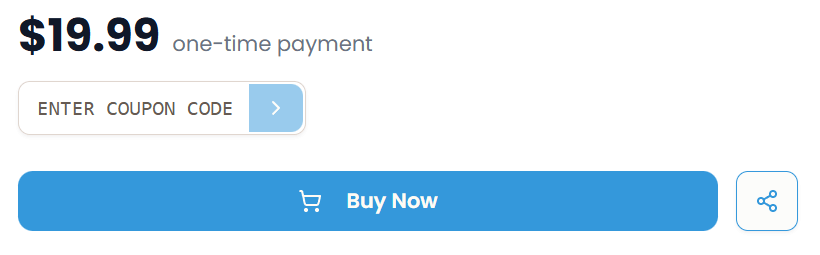
If a coupon is invalid, customers will see an error message.
Managing Your Coupons
View all your coupons at App → Coupons.
Available Actions:
- Filter by status: All, Active, Draft, Disabled
- Search by code: Find specific coupons quickly
- Click to edit: Change any field except the coupon code
- Disable temporarily: Set status to Disabled, reactivate anytime
Tracking Usage: When a customer uses a coupon, you'll see:
- Coupon code on the order details
- Discount amount tracked
- Subtotal, discount, and total saved
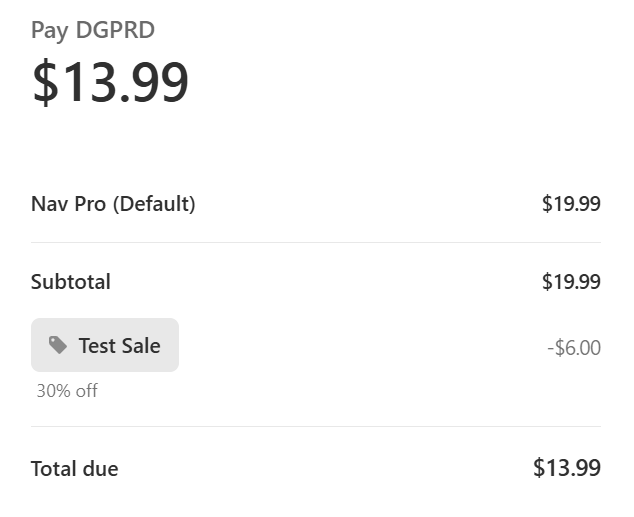
Note: Coupons can't be permanently deleted—they're archived for order history tracking.
Best Practices
Coupon Code Strategy
Make codes memorable and clear:
- ✅ Good:
SUMMER25,SAVE50,WELCOME - ❌ Bad:
XJ8K9PQR,8D73NK2L
Match the offer:
SAVE20for 20% offGET10OFFfor $10 offHALFOFFfor 50% off
Prevent Abuse
- Set max uses per customer = 1 for public coupons
- Monitor usage in the coupon dashboard
- Disable suspicious codes immediately
- Use unique codes for influencers to track attribution
Communication Tips
Where to share coupons:
- Email newsletters
- Social media posts
- Partner websites
- Abandoned cart emails
How to present:
- Clearly state the offer
- Mention any restrictions
- Include expiration date
- Show example savings
Troubleshooting
If a customer says a coupon isn't working, check:
- ✅ Is the status set to Active?
- ✅ Has the expiration date passed?
- ✅ Has the usage limit been reached?
- ✅ Does it apply to that product?
- ✅ Has this customer already used it?
Common Error Messages
Error | Cause | Solution |
|---|---|---|
"Coupon code invalid or expired" | Code doesn't exist, expired, or disabled | Check status, expiration, and spelling |
"Coupon doesn't apply to this product" | Product-specific coupon on wrong item | Add product or create different coupon |
"Usage limit reached" | Max uses exceeded | Increase limit or create new code |
Advanced: Campaign Ideas
Influencer Codes Give influencers unique codes to track performance:
- Code:
ALEX20(for influencer Alex) - Track which influencer drives sales
- Limit per customer prevents abuse
Tiered Discounts Reward different customer segments:
- New customers:
NEW15(15% off) - Returning:
RETURN25(25% off) - VIP:
VIP40(40% off)
Bundle Promotions Promote complementary products:
- "Get Template Pack at 30% off with code
BUNDLE30" - Increases average order value
Need help with coupon strategy? Contact support@indiestand.com.